FAQs
Editing
Conversion
copywriting
Editing
General
Top 10
Translation
1. Where do I find how many words
my text contains?
2. What if I want my footnotes to be edited?
3. I’m concerned about copyright. No one
will be able to takemy ideas, will they?
4. What is the difference between
human editing and machine editing?
5. What kinds of documents do you edit?
6. Do you offer website editing?
7. What types of files do you accept?
8. Can you edit PDF files?
15. Do you offer revisions?
16. What if I’m not satisfied with your work?
17. Can I cancel my order?
18. Do you have a minimum order size?
20. Where can I find my editor’s code?
19. My deadline is sooner than
the turnaround time on the quote.
Is there a way I can get
my document edited faster?
9. Why can’t you just edit the text
of PDF files directly on the page?
10. Why are there still comments
on my clean file?
11. I sent you an MS Word file, but I
can’t see any corrections. Why’s that?
12. I submitted an MS Word file, and now
all your revisions and suggestions
are highlighted in red. How do I accept
these changes quickly?
13. Why can’t I make any changes
to the document you returned to me?
14. I submitted a file type other than
MS Word. Why can’t I see
what you’ve changed?
Option 1: To see your word count, simply drag and drop or upload your file in the order form.
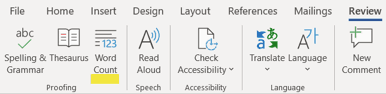
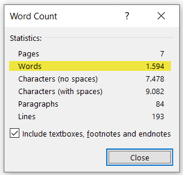
Option 2: MS Word has an easy-to-use, built-in tool to keep track of your word count. Go to the Review tab or Tools menu in your taskbar and select Word Count.
A box will open displaying the number of words, as well as the number of characters, paragraphs, lines, and pages, contained in your document.
If you want your footnotes or endnotes to be edited, please make sure that you mention it in the “Additional notes” field of the order form.
Absolutely not. Your work is protected! Denglisch Docs and its language professionals make no claim on your copyright and never commercially reproduce, distribute, or display your intellectual property. We also do not require credit, acknowledgment, or anything else beyond the fees we charge for the services we render. Your work is always your work, and all of your files and data are absolutely safe on our secure, encrypted system.
Human editors can understand context and the meaning of your writing, and they can figure out what you’re trying to say and relay your message, even if you’re struggling to express it yourself.
Software can’t do this! Most computer programs simply correct grammar and spelling, which is only the first step in providing a great edit. And they still struggle even with this.
Check out some of the differences between our experts and automated software tools below.
We review, revise, and edit just about every time of document there is: from academic and personal to corporate documents and marketing materials.
No matter your subject or field, rest assured that we have professionals who can edit it.
We don’t just offer website editing, we specialize in editing, translating, and even writing web copy. We do work for all types of websites.
Reminder: If only some of your text is highlighted, then MS Word will calculate only that particular section of text.
Please note: We try to double-check word counts on all documents, but to ensure that there are no delays in processing your order, please try to give us an accurate count. If there is a section that you don’t want us to check, please mention this in the “Additional notes” field of the order form.
Option 3: Depending on your MS Word settings, the word count may also be displayed live on the left side of the bottom bar of the document window. You can click on it to get additional information about your document, such as the number of pages and characters.
We can certainly work with PDF files, also known as Portable Document Format files. However, because PDF files are not designed to be edited, we can’t actually make the changes directly to the text. Instead, we use PDF annotation tools (like the highlighter and comment bubbles) to show you where corrections are needed.
So, if you send us a PDF file, we will review it and send back the highlighted corrections for you to make in the original document. If you want us to be able to make the changes directly to your document, please send us the original .doc or .docx file that was used to generate the PDF.
A PDF file is specifically designed to lock down your work in the format that you created it in so that it can’t be easily edited or tampered with. When you send your PDF files to any computer, they usually look the same regardless of how the receiving computer is set up. They are often used for contracts and forms because they help guarantee that the receiving party isn’t changing the terms or fields prior to signing.
We accept most word-processing files, such as MS Word, WordPerfect, WordPad, Notepad, MS Works, Adobe Acrobat, MS Excel, MS PowerPoint, OpenOffice, Final Draft, and LaTeX. If you have Apple/Macintosh or Linux/Unix files, they can be saved and uploaded as a .doc, .docx, .txt, or .rtf. If you are using a program not listed here, save your file as a text (.txt) file or a Rich Text file (.rtf).
Please see the “Can you edit PDF files?” section of this FAQ page before sending us a PDF file. If you’re still not sure about your file format, please feel free to contact us.
We accept the following file extensions (the last part of your file name):
While the _CLEAN_REVISED file has incorporated all the revisions into your document, the comments have not been removed because they often focus on issues that you may still have to address. To make sure that our clients are aware of all the important issues in their documents, we keep the editor’s comments in the clean file. Once you’ve reviewed the editor’s suggestions and made any necessary changes, it’s easy to remove the comments.
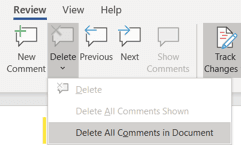
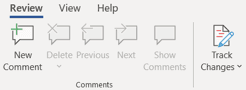
In MS Word files (.doc and .docx), click the Review tab on the taskbar and then the Delete icon. In the dropdown menu, you can quickly remove the comments one by one (by clicking Delete in the menu) or all at once (by clicking Delete All Comments in Document in the menu).
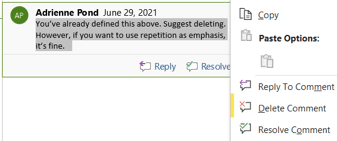
Another way to delete a comment is right-click on a comment balloon. When the fly-out menu opens, simply click Delete Comment.
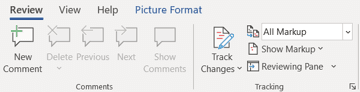
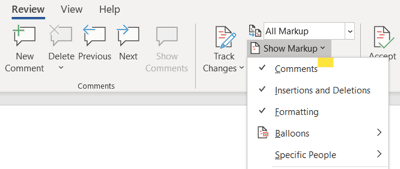
The changes may not be visible because the Show Markup feature in MS Word is turned off or if Word is not in the right View to see changes.
To correct this, click the Review tab:
Then click the Show Markup menu to make sure all the markup options are checked:
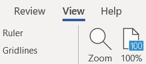
You can also try changing your View. First, click the View tab:
For MS Word files (.doc and .docx), we use the Track Changes and the Comments features. You can access the Track Changes and Comments tools by clicking on the Review tab.
You can use the tools on the Review tab to Accept or Reject changes one by one, or you can Accept or Reject the changes all at once.
You can also right-click on individual changes in the document to access the Accept/Reject functions.
You can also delete the comments with the Review tab.
Right-clicking on a comment balloon also brings up a Delete Comment function in the fly-out menu.
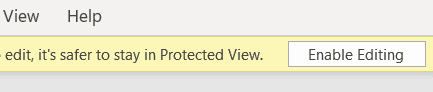
Sometimes documents downloaded from a website will show up in “Protected View.” You have to click the Enable Editing button at the top of your document.
Unfortunately, very few word processing programs have anything similar to MS Word’s Track Changes feature, which allows our editors to highlight changes. However, our staff will have summarized their changes in their notes back to you, and you can compare what we’ve sent back to you with your original document.
Minor tweaks are always on us. Additions and sizable changes will be quoted separately.
We take customer satisfaction very seriously. If you’re not happy with the result, please get in touch with us, and we’ll look into the matter right away. If you’re still unsatisfied, we will issue a full refund to you. Please read our no-questions-asked, money-back refund policy.
If you have to cancel your order, please get in touch with us as soon as possible to reduce unnecessary work from being completed on the document.
There’s no minimum order size, but we do have a minimum charge of €19 to cover administrative costs. If you have several small documents, you might consider putting them all in one order to get the best value for your money.
Yes! If you have a long document, such as a dissertation, you can send your work in sections (e.g., by chapter). You’d have to divide your work into separate documents, place multiple orders at once, and specify any style guide requirements or instructions in all of your orders.
Please note: Because different editors will be assigned to each section of your document, it will be completed faster than it would be with just one editor. However, working with multiple editors could pose a risk of inconsistency with regard to style.
You can find the code of the editor who worked on your document by checking Expert’s code in the Order history in your account. If you still can’t find the editor’s code, please feel free to get in touch.
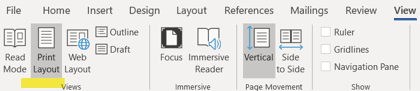
Then click the Print Layout View button:

Total components
10/10
2.5/10
Components
Clarity of meaning context
Yes
No
Denglisch Docs
vs
Software
Natural English expressions
Yes
No
Application of style guide
Yes
No
Font & spacing consistency
Yes
No
Spell check
Yes
No
Typos
Yes
No
Grammar
Yes
No
Critical commentary
Yes
No
Suggestions for improvement
Yes
No
Language authenticity
Yes
No
•
•
•
•
•
•
•
•
•
•
•
•
•
•
•
Business websites
Blogs
eCommerce websites
Personal websites
Membership websites
Portfolios
Media and news websites
Event websites
Educational websites
Political websites
Online forums
Wiki and community websites
Web portals
Non-profit websites
Informational websites
•
•
•
•
•
.csv
.doc
.docx
.fdx
.htm
•
•
•
•
.html
.odt
.ppt
•
•
•
•
.pptx
.rtf
.tex
.txt
•
•
•
•
.wpd
.wps
.xls
.xlsx




COMPLIANT
Denglisch Docs GmbH is part of Metanoia Editing Inc.,
353 Lexington Avenue, New York, NY 10016.
Context is one of the Denglisch Docs brands.
Learn more at www.denglischdocs.com.
Denglisch is a registered trademark of Denglisch Docs GmbH.
®
©
2023 Denglisch Docs GmbH
Made with

and a lot of

in
New York
Contact
Legal stuff
About us
NDA
Get in touch
Our team
Pricing
FAQ
Jobs
Terms of use
Legal notice
Who we are
Privacy policy
What we do

Why we’re here
Email us
support@denglischdocs.com
Call us
+49 211 946 24 172
Live chat
Mon – Fri, 9:00 a.m. – 9:00 p.m.

Hi there!
Search
EN
DE
About us
Pricing
Who
Order now
You don’t have to break
the bank to afford
proper English
You don’t want us
twitching and glitching,
do you?
Let’s just look out
for each other
No upfront payment. No hidden fees
Editing
Conversion copywriting
Order
€0.09
Request
A custom quote
per word
Translation
Order
€0.19
per word
Raising awareness
We’re on a mission to make English
affordable without hurting the people
in the industry. We refuse to participate
in the race to the bottom and stand
by our word to pay fair rates to our
language professionals.
How are we expected to offer impeccable quality at this rate and pace?

About us
Our team
Who we are
What we do
Why we’re here
Legal stuff
NDA
Terms of use
Legal notice
Privacy policy
Contact
Get in touch
Pricing
FAQ
Jobs
©
COMPLIANT
Context is one of the Denglisch Docs brands.
Learn more at www.denglischdocs.com.
Denglisch Docs GmbH is part of Metanoia Editing Inc., 353 Lexington Avenue, New York, NY 10016.
Denglisch® is a registered trademark
of Denglisch Docs GmbH.
Follow us on social media
2023 Denglisch Docs GmbH
Made with
and a lot of
in
New York
4. What stage(s) of awareness should
this copy speak to?
Unaware
Solution-aware
Product-aware
Problem-aware
Most aware
5. Who are your competitors?
Those you admire:
Those you do NOT want to be compared to:
6. What is the outcome you’re selling?
How will your customers benefit from
your products or services?
Back
Next
EN
DE