FAQs
Translation
Conversion
copywriting
Editing
General
Top 10
Translation
1. What qualifications do your translators have?
3. Do you offer website translations?
2. What types of texts can your
translators handle?
4. What do you need to start
translating our website?
5. What about Desktop Publishing
(DTP) Services?
6. What types of files do you accept?
7. What do you need to know
before translating my text?
8. What if I want my footnotes to be translated?
11. Is there a minimum order size?
15. Do you offer revisions?
14. How can I find my translator’s code?
16. What if I’m not satisfied with your work?
17. Can I cancel my order?
18. My deadline is sooner than
the turnaround time on the quote.
Is there any way I can get
my document translated faster?
9. Why can’t I just use Google Translate?
After all, it’s free.
10. Where do I find how many words
my text contains?
12. What’s the difference between human
translation and machine translation?
13. I’m concerned about copyright. No one
will be able to take my ideas, will they?
Part of our process for vetting each translator is the verification of a translation qualification of some kind, be it a translation degree or a certificate from an internationally recognized certifying body. This is where we differ from the big agencies, which rarely require or verify credentials.
You can trust us with any and every type of text. Our team of translators can handle any common subject matter category: marketing, technical, financial, etc.
We also translate more specialized texts, but we ask for your understanding in us taking the time to source the perfect translator for the task. Unlike most agencies, we don’t claim to have thousands of translators at the ready. Nor will we assign these texts to a general translator and simply hope they do a good job. We will find the specialist you need!
We don’t just offer website translations, we specialize in translating, editing, and even writing web copy. We work on all types of websites.
This might seem straightforward, but unfortunately, it’s not. You essentially have three options, which are listed here in order of preference (read: cheapest, fastest, most error-proof method for you!):
Option 1: Copy and paste each page of your web copy into a word processor (e.g., MS Word) and send that to us.
Please see our General FAQs for more information on why we prefer .doc and .docx file formats.
Option 3: Supply us with your website’s source code in HTML, PHP, or any other format.
Option 2: Put your URL (your website link) into the project notes, and we will copy and paste your web copy into a word processor and deliver that format to you.
Advantage: Cheapest, fastest, most error-proof method! No botched code, no problem if you’re currently working on your site, no wasted time or money to have us do anything other than what we do best . . . translate! Disadvantage: You do the copying and pasting.
Advantage: Fast and error-proof. Disadvantage: You’ll pay a small fee for us to process the text (i.e., copying and pasting into Word) so it can be translated.
Advantage: Admittedly, this is the most seamless option for you. Disadvantage: We’ll need a bit of time to find the right professional (it will also probably take them just a hair longer to translate within your code rather than focusing on the text), and there will be a small fee associated with this. And while our professionals are excellent at what they do (like, really excellent!), they are still humans capable of making mistakes, and translating within the source code can sometimes introduce inadvertent errors. We’d hate for you or us to lose time on something like that!
Desktop Publishing requires a profound understanding of different file formats and the software that was used to create them.
If your document has special formatting requirements, it needs an extra layer of attention. This can happen when you send us a text that is not in an electronically readable format. Documents that have been printed and scanned with poor quality as well as documents with handwritten content (common with images or mathematical formulas) are examples of this.
More commonly, DTP has to be part of the process out of consideration for the file you receive. This is the case if your document is going to be published, whether electronically or in hard copy.
In addition to working with special programs for these types of files, such as Adobe Illustrator, care must be taken on our part to ensure a professional, readable layout. The translated text (German) is virtually always a different length than the source text (English), which means that someone needs to fix the layout accordingly to make sure that it matches the layout of the original file.
That is why it is always preferred to handle the text alone in a common word processing file format. However, if you would like to engage our DTP service department, we will carefully review your request and provide a custom quote for your project.
We accept all word processing file formats. These files end in .doc, .docx, .txt, or .rtf and come from programs like MS Word, WordPad, Notepad, TextEdit, or LibreOffice. We also accept a number of other common file types (check out the list below), including PowerPoint, PDF, and Excel files. If you’re still not sure about your file format, please feel free to contact us.
We accept the following file extensions (the last part of your file name):
If you want your footnotes or endnotes to be translated, make sure to mention it in the “Additional notes” field of the order form.
Contrary to what the trendy news articles might have you believe, machine translation (MT) has a long way to go. It is still entirely inappropriate for professional content that can make or break a business deal or cost a sale. MT still makes mistakes – from merely sounding unnatural to a native speaker, to translating the opposite of what was meant.
Simply fill out the order form providing as much information about the purpose of the translation as possible in the “Additional notes” field. For instance, a press release being translated for internal employees just to understand the content is quite different from the same press release being translated for external customers.
Option 1: To see your word count, simply drag and drop or upload your file in the order form.
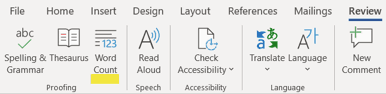
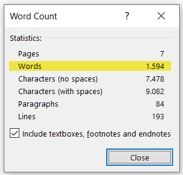
Option 2: MS Word has an easy-to-use, built-in tool to keep track of your word count. Go to the Review tab or Tools menu in your taskbar and select Word Count.
A box will open displaying the number of words, as well as the number of characters, paragraphs, lines, and pages, contained in your document.
Option 3: Depending on your MS Word settings, the word count may also be displayed live on the left side of the bottom bar of the document window. You can click on it to get additional information about your document, such as the number of pages and characters.
Reminder: If only some of your text is highlighted, then MS Word will calculate only that particular section of text.
Please note: We try to double-check word counts on all documents, but to ensure that there are no delays in processing your order, please try to give us an accurate count. If there is a section that you don’t want us to check, please mention this in the “Additional notes” field of the order form.
There’s no minimum order size. However, we do have a minimum charge of €19 to cover our administrative costs. Simply put, if your text contains fewer than 100 words, we’ll have to apply the cost of 100 words to cover our expenses.
Human translators can understand the context and meaning of your writing, and they can figure out what you’re trying to say and relay your message, even if you’re struggling to express yourself.
Software can’t do this! Translating words is only the first step in providing accurate translation of our customers’ ideas, and machines still struggle even with this.
Check out some of the differences between our experts and automated software tools below.
Absolutely not. Your work is protected! Denglisch Docs and its language professionals make no claim on your copyright and never commercially reproduce, distribute, or display your intellectual property. We also do not require credit, acknowledgment, or anything else beyond the fees we charge for the services we render. Your work is always your work, and all of your files and data are absolutely safe on our secure, encrypted system.
You can find the code of the translator who worked on your document by checking Expert’s code in the Order history in your account. If you still can’t find the translator’s code, please feel free to get in touch.
Minor tweaks are always on us. Additions and sizable changes will be quoted separately.
We take customer satisfaction very seriously. If you’re not happy with the result, please get in touch with us, and we’ll look into the matter right away. If you’re still unsatisfied, we will issue a full refund to you. Please read our no-questions-asked, money-back refund policy.
If you have to cancel your order, please get in touch with us as soon as possible to reduce unnecessary work from being completed on the document.
Yes! If you have a long document, such as a user manual, you can send your work in sections (e.g., by chapter). You’d have to divide your work into separate documents, place multiple orders at once, and specify any style guide requirements or instructions in all of your orders.
Please note: Because different translators will be assigned to each section of your document, it will be completed faster than it would be with just one translator.However, working with multiple translators could pose a risk of inconsistency with regard to style and word choice.
If you prefer to discuss your project personally, feel free to get in touch with our customer support, and we’ll be more than happy to find a perfect solution for you.
•
•
•
•
•
•
•
•
•
•
•
•
•
•
•
Business websites
Blogs
eCommerce websites
Personal websites
Membership websites
Portfolios
Media and news websites
Event websites
Educational websites
Political websites
Online forums
Wiki and community websites
Web portals
Non-profit websites
Informational websites
•
•
•
•
•
.csv
.doc
.docx
.fdx
.htm
•
•
•
•
.html
.odt
.ppt
•
•
•
•
.pptx
.rtf
.tex
.txt
•
•
•
•
.wpd
.wps
.xls
.xlsx

Total components
10/10
2.5/10
Components
Clarity of meaning context
Yes
No
Denglisch Docs
vs
Software
Natural English expressions
Yes
No
Application of style guide
Yes
No
Font & spacing consistency
Yes
No
Spell check
Yes
No
Typos
Yes
No
Grammar
Yes
No
Critical commentary
Yes
No
Suggestions for improvement
Yes
No
Language authenticity
Yes
No
COMPLIANT
Denglisch Docs GmbH is part of Metanoia Editing Inc.,
353 Lexington Avenue, New York, NY 10016.
Context is one of the Denglisch Docs brands.
Learn more at www.denglischdocs.com.
Denglisch is a registered trademark of Denglisch Docs GmbH.
®
©
2023 Denglisch Docs GmbH
Made with

and a lot of

in
New York
Contact
Legal stuff
About us
NDA
Get in touch
Our team
Pricing
FAQ
Jobs
Terms of use
Legal notice
Who we are
Privacy policy
What we do

Why we’re here
Email us
support@denglischdocs.com
Call us
+49 211 946 24 172
Live chat
Mon – Fri, 9:00 a.m. – 9:00 p.m.

Hi there!
Search
EN
DE
About us
Pricing
Who
Order now
Sign in
Sign in
Email address
Password
Remember me
Forgot password?
By continuing you accept our Terms of Use
and Privacy Policy.
Log in
Registration
9. Specifics
Are there specific slogans, taglines, words
that should be used?
7. Unique selling proposition (USP)
What makes you stand out from the crowd?
8. Who’s your target audience?
Demographic
Gender
Place of residence
Age
Back
Next
EN
DE